Unlocking the Benefits: A Comprehensive Guide to Ubisoft Connect
Quick answer: What is Ubisoft Connect?
- What it is: Ubisoft Connect is Ubisoft’s player service for supported PC and console games. It brings together account access, friends, challenges, rewards and cloud saves where available.
- Rewards: Ubisoft has offered a 100-Unit redemption for a 20% Ubisoft Store discount. Check the current terms and eligibility before relying on this offer.
- Cross-progression: Supported in certain games and platform combinations, not universally across every Ubisoft title.
- Important precaution: Check the consequences before unlinking or relinking platform accounts, especially if your game progress or purchases are involved.
Ubisoft Connect is the hub behind many Ubisoft PC and console games. Whether you play Rainbow Six Siege with friends, continue a supported game on another device, or buy Ubisoft games through Steam or the Epic Games Store, you may encounter Ubisoft Connect during setup or gameplay.
Players often notice the service when something goes wrong: a launcher error, a missing save, an account-linking problem or rewards that do not appear. This guide explains how the service works, what to know about Units, how it compares with other PC storefronts, and how to troubleshoot common issues.
1. What Ubisoft Connect is and how it works
Ubisoft Connect is Ubisoft’s player-service ecosystem. It evolved from the older Uplay and Ubisoft Club services and uses a Ubisoft account to connect supported games and features. You can start at the official Ubisoft Connect page. Windows users can also check the Microsoft Store listing for availability and current installation information. For historical background, see the Ubisoft Connect overview on Wikipedia.
In practical terms, the service helps manage access to supported games, keeps account and social features together, and tracks challenges and rewards. The exact features depend on the title and platform.
Account and ownership checks
Progress syncing in supported games
Challenges, levels and eligible items
Key features
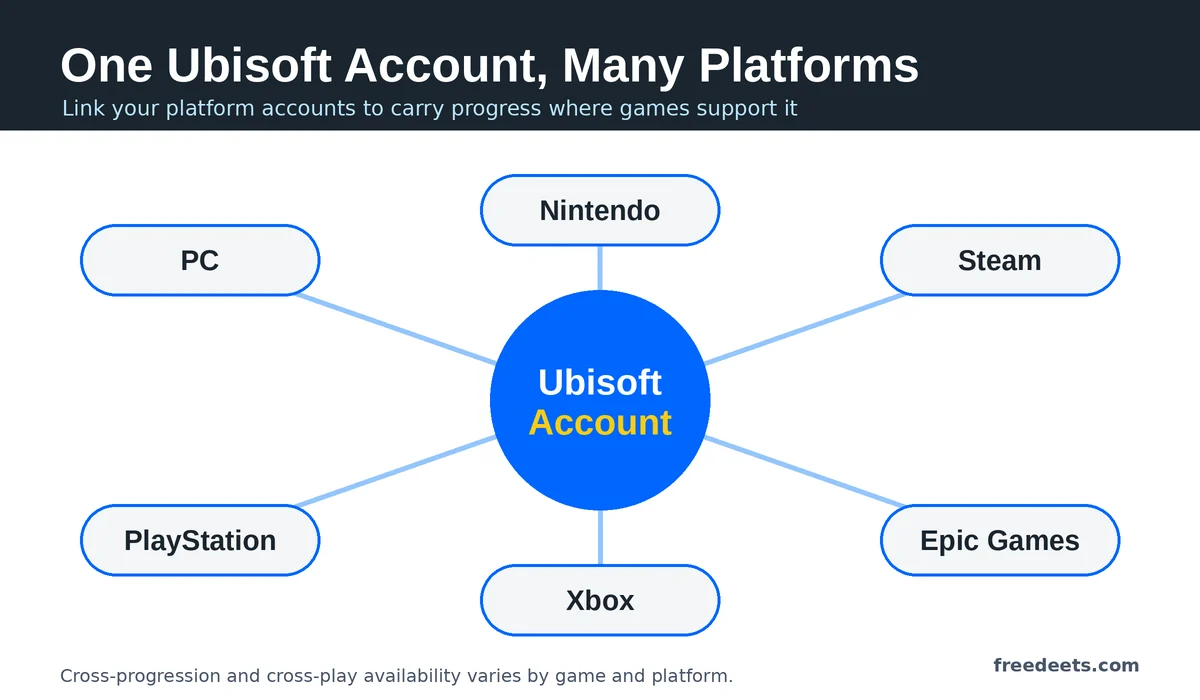
- Linked platform accounts: Depending on the game, you may connect services such as PlayStation Network, Xbox, Steam, Epic Games or Nintendo to your Ubisoft account.
- PC game launching: Ubisoft PC games purchased through another storefront may still require Ubisoft account authentication and Ubisoft Connect.
- Cloud saves: Supported titles can synchronise progress online. Do not assume every game or platform supports this feature.
- Social features: Depending on the title and current service, you may have access to friends, chat, an in-game overlay or other social tools.
- Library and discovery: The PC app helps manage supported games and may provide access to trials, betas and Ubisoft+ information.
2. Cross-progression and linked accounts
Cross-progression allows compatible game progress or unlocks to carry across supported platforms. It is different from cross-play, which allows players on different platforms to play together. A game may support one feature without supporting the other.
Ubisoft’s official Help Centre is the appropriate place to verify the rules for a particular game. Check those rules before buying a second copy or moving to another platform.
What may transfer between platforms?
- Campaign progress: Some titles support cross-platform save synchronisation, while others keep progress tied to a platform or particular version.
- Unlocks and cosmetics: Certain online games link eligible items to an account, but transfer rules differ by title.
- Premium currency: Currency purchased through a console or PC storefront may be platform-restricted. Check the game’s specific rules before purchasing.
- Game ownership: Linking accounts does not automatically mean that a game purchased on one platform is owned on every other platform.
Before unlinking or relinking an account
Do not assume that changing a linked platform account will move your saves, purchased content or progression to another profile. Review the official guidance for the game and contact Ubisoft Support if the consequences are unclear. Avoid making account changes until you understand the potential impact.
A simple way to reduce the risk of lost progress
Before beginning a long game session on a new device, confirm that the correct platform account is linked. If the game supports cross-progression, complete a short test session, exit normally, allow time for synchronisation, and check the save on the other supported device. This is a useful precaution, not a guarantee that every game will transfer progress.
3. Units: earning, redeeming and expiry
Units are reward points associated with Ubisoft Connect. Ubisoft has published information about redeeming Units for discounts at its online store. Its Ubisoft Units announcement and official challenges and rewards guidance are useful starting points. Because reward programmes can change, verify the current redemption rate, eligibility and exclusions in your account before checkout.
| Reward activity | How it works | What to verify |
|---|---|---|
| Challenges and levels | Eligible game challenges may contribute to progression and rewards. | Available challenges and reward amounts vary by game and programme. |
| Store purchases | Ubisoft has described earning Units through eligible Ubisoft Store spending. | Confirm the current earning rate, currency and eligible purchases. |
| New-account rewards | Promotional or welcome rewards may be offered to eligible users. | Do not assume a welcome bonus is available to every new account today. |
| Store discount | Ubisoft has advertised a redemption of 100 Units for a 20% store discount. | Check the current offer, regional availability, eligible products and exclusions. |
| In-game rewards | Some games offer eligible items through their rewards interface. | Item availability and the required number of Units differ by title. |

Rules to check before redeeming Units
- Expiry: Units may be subject to expiry rules. Check the current Ubisoft terms and the dates displayed for your own balance instead of relying on an assumed expiry period.
- Account transfers: Do not assume Units can be transferred or combined across different Ubisoft accounts. Check the official account and rewards rules.
- Discount exclusions: A promotional discount may exclude subscriptions, in-game purchases, products containing virtual currency or other categories. Read the conditions shown at checkout.
- Ubisoft+: Ubisoft+ is a separate subscription service. Its benefits and reward rules may differ from those of the standard Units programme. See the Ubisoft+ Help Centre.
How to make better use of your rewards
- Check your current Units balance and any displayed expiry dates.
- Compare the final checkout price with other legitimate offers before redeeming a discount.
- Read the redemption conditions carefully, especially if the cart contains several products or a subscription.
- Keep a record of the transaction if a discount or reward does not appear as expected.
4. Ubisoft Connect vs Steam vs Epic Games Store
Ubisoft Connect and the Ubisoft Store serve a different purpose from general PC storefronts such as Steam and the Epic Games Store. Ubisoft Connect focuses on Ubisoft’s ecosystem, while Steam and Epic offer games from multiple publishers. For Ubisoft PC games purchased through another store, Ubisoft account authentication may still be required.
| Feature | Ubisoft Connect / Store | Steam | Epic Games Store |
|---|---|---|---|
| Game catalogue | Centred on Ubisoft games and services | Games from many publishers | Games from many publishers |
| Ubisoft account | Used for supported Ubisoft services | May also be required for Ubisoft games | May also be required for Ubisoft games |
| Rewards | Ubisoft Units and eligible Ubisoft rewards | Steam Points and associated community items | Epic Rewards and other eligible promotions |
| Community features | Ubisoft friends and supported social features | Community features, forums and Workshop support for eligible games | Friends, social features and supported game services |
| Best fit | Players focused on Ubisoft games and rewards | Players who prefer Steam’s library and community ecosystem | Players who prefer Epic’s catalogue and available offers |
Which store should you choose?
If you prefer to collect Ubisoft rewards and buy eligible games directly from Ubisoft, compare the Ubisoft Store’s final price and current promotions. If you prefer keeping your PC library in Steam or Epic, those stores may be more convenient. Compare platform features, regional pricing, refund policies and any launcher requirements before deciding.
Epic Rewards and other promotional rates can change. Check the Epic Games Store and its current terms rather than relying on an older advertised percentage.
5. Setup and account security
- Create or access your Ubisoft account. Start from the official Ubisoft Connect page.
- Secure your account. Use a strong, unique password and enable two-step verification if available for your account.
- Install the PC app if required. Download it from Ubisoft’s official website or a verified distribution channel. Follow the current installation instructions.
- Link your platform account. Use your Ubisoft account settings and confirm that you are signing in to the intended platform profile.
- Review supported features. Check the game’s settings and help documentation for cloud-save, overlay and synchronisation options.
Account security essentials
- Never share your password, verification codes or recovery codes.
- Be cautious of messages promising free Units, skins or discounts in exchange for account access.
- Navigate to the official Ubisoft website yourself if a message asks you to sign in.
- Use a unique password and keep your account recovery information current.
- If you notice unexpected account activity, use the official account-security and support options promptly.
6. Troubleshooting common problems
The launcher will not open or a game will not start on PC
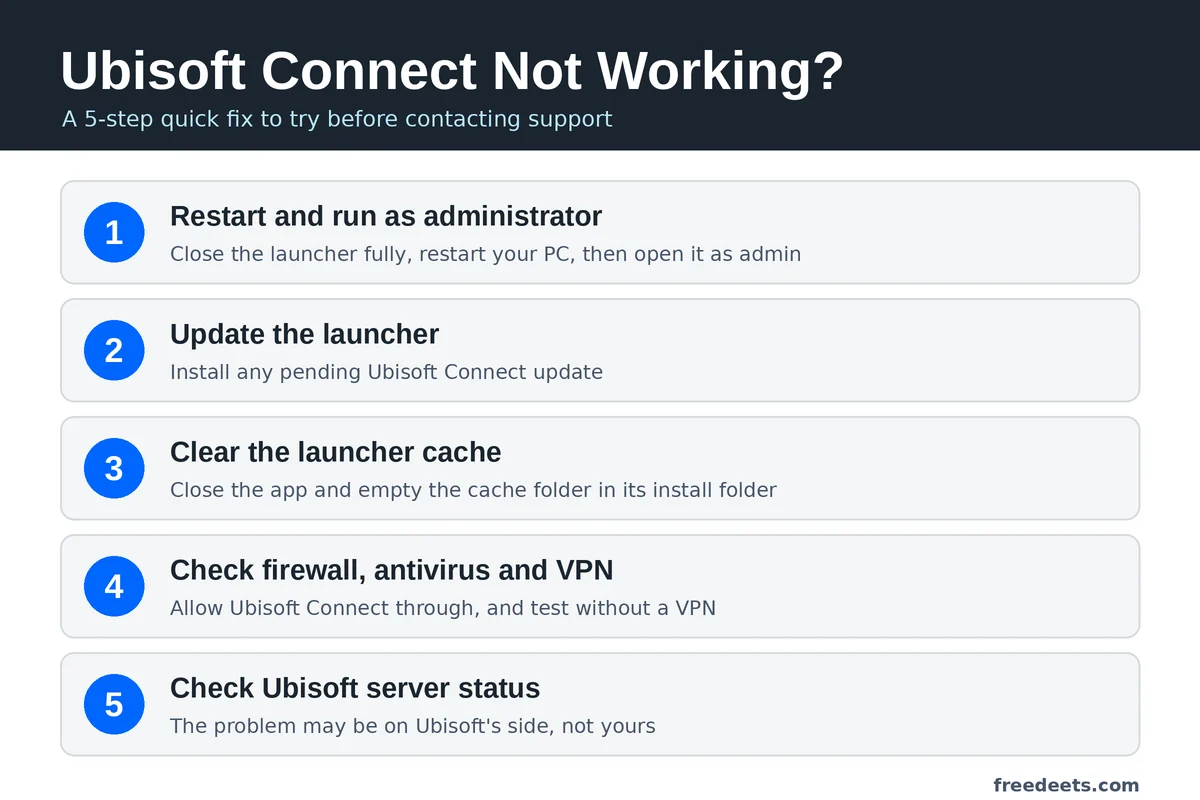
- Close Ubisoft Connect completely and restart the computer.
- Check whether the app needs an update and install it from an official source.
- Check whether your computer’s security software is blocking the app. Change firewall or antivirus settings only when you have verified the application and understand the implications.
- If the issue persists, consult the Ubisoft Help Centre for the current repair, cache-clearing or reinstall instructions for your version.
“You do not own this game” after buying it on Steam or Epic
- Confirm that the Ubisoft account currently signed in is the one associated with the game.
- If you have more than one Ubisoft account, verify which account was used when the game was first activated.
- Check the purchase confirmation and the game’s platform-specific activation instructions.
- Avoid unlinking accounts or attempting to transfer ownership without official guidance.
Cloud-save conflicts or missing progress
- Exit the game normally and allow time for any synchronisation process to finish.
- If prompted to choose between saves, compare timestamps and available progress information before selecting one.
- Do not overwrite a potentially newer save until you have checked the available recovery options.
- Confirm that the specific game and platform support cloud saves or cross-progression.
Connection errors
- Check your internet connection and restart your router if appropriate.
- Temporarily test whether a VPN or proxy is contributing to the issue, while following your network or organisation’s policies.
- Check Ubisoft’s official support channels for service interruptions or known issues.
- Use the game’s current official network troubleshooting guidance before changing advanced firewall or router settings.
Rewards or Units are missing
- Confirm that you are signed in to the account on which you completed the challenge or made the purchase.
- Review the challenge’s completion conditions and the reward’s eligibility rules.
- Allow for any processing time stated by Ubisoft.
- If the reward remains missing, contact Ubisoft Support through its official website. Provide the relevant transaction or challenge information without sharing your password or verification codes.
Quick troubleshooting checklist
- Secure your account and enable available verification protections.
- Confirm the correct account is linked before playing on another platform.
- Check official support information before changing account links or save files.
- Review the current terms before redeeming Units.
- Use official support if an error persists or progress appears to be missing.
7. Pros and cons
Potential advantages
- Core account services are available without a separate paid Ubisoft Connect subscription.
- Central account management for supported Ubisoft games.
- Cloud saves and cross-progression in eligible titles.
- Challenges and rewards for supported games.
- Integration with certain PC storefronts and platforms.
Potential drawbacks
- An additional account or launcher may be required.
- Cross-progression is not available in every game.
- Rewards and discount rules may change and include exclusions.
- Purchased content and premium currency may remain platform-specific.
- Account-linking mistakes can complicate access to progress or purchases.
8. Frequently asked questions
Is Ubisoft Connect free?
Ubisoft Connect’s core player service is free to use with a Ubisoft account. Games, additional content and subscriptions such as Ubisoft+ may cost money.
Do I need Ubisoft Connect if I buy a Ubisoft game on Steam or Epic?
Many Ubisoft PC games purchased through other storefronts still require Ubisoft account sign-in and may launch through Ubisoft Connect. Requirements depend on the specific game and platform.
How many Units are needed for a Ubisoft Store discount?
Ubisoft has advertised a 20% store discount for 100 Units. Check your account and the current official offer to confirm whether it remains available and which purchases qualify.
Can I transfer Units to another Ubisoft account?
Do not assume that Units can be transferred or combined between accounts. Check Ubisoft’s current official account and rewards terms for the applicable rule.
Does the Units discount work on subscriptions or in-game purchases?
Discounts can have product exclusions. Review the current redemption terms and the checkout conditions to determine whether subscriptions, in-game purchases or products containing virtual currency are excluded.
Does cross-progression work in every Ubisoft game?
No. Support depends on the game and platform combination. Check the game’s official documentation before expecting progress to transfer.
What should I do if my Ubisoft Connect account is linked to the wrong platform?
Before changing the link, review Ubisoft’s official guidance for the game and account involved. If you are uncertain about the effect on your purchases or progress, contact Ubisoft Support before making changes.
Conclusion
Ubisoft Connect brings together account access, social features, challenges and rewards for supported Ubisoft games. Its usefulness depends on the titles you play and the platforms you use. Cloud saves, cross-progression and promotional discounts can be helpful, but availability and eligibility should never be assumed across every game or account.
To avoid common problems, secure your account, check platform links before starting a new game, protect existing saves and verify current reward conditions before spending Units. When a technical issue affects purchases or progress, official support is safer than experimenting with account changes.
If you find an outdated detail in this guide, please contact Free Deets. You can also visit Free Deets for more technology guides and practical explainers.