Mastering Image & Video Optimization for High-Intent Traffic
In the modern search ecosystem, executing structured image & video optimization is no longer just a cosmetic design choice—it is a critical driver of organic rankings, reader dwell time, and user conversion. As search engines deploy multi-modal indexing algorithms, non-textual assets serve as powerful ranking signals. This comprehensive guide breaks down actionable image & video optimization strategies, technical compression pipelines, schema configurations, and Core Web Vitals fixes to capture high-intent organic traffic.

For years, search engine optimization centered primarily on text-heavy signals: targeted keywords, heading tags, and backlink anchors. While written copy remains foundational, visual assets directly influence how search bots score user satisfaction and site quality. According to technical documentation from Google Search Central, properly formatted visual media enables content to rank within Google Images, video carousels, and rich discovery grids.
Executive Summary: The Multi-Modal SEO Shift
Unoptimized media assets remain the leading cause of poor Largest Contentful Paint (LCP) and Cumulative Layout Shift (CLS). By combining next-gen image compression (WebP/AVIF) with VideoObject structured data, you satisfy Core Web Vitals while expanding your presence across visual search platforms.
1. How Visual Assets Drive User Dwell Time and Engagement
User experience (UX) and organic rankings are closely interconnected. When readers land on pages consisting of unbroken text walls, bounce rates spike immediately. High-quality visual assets act as cognitive anchors, improving scannability and keeping visitors engaged throughout the article:
- Scannable Article Structure: Strategic diagrams, charts, and infographics break complex topics into digestible sections, significantly extending average session durations.
- Contextual Proof for Commercial Intent: B2B and e-commerce buyers demand visual verification. Clear workflow illustrations, interface screenshots, and comparison tables reduce hesitation and drive conversions.
- Mobile Viewport Stability: Visual assets scaled with responsive markup prevent layout warping on smartphone displays, keeping mobile users on-site longer.
2. Technical Image Optimization: Next-Gen Formats and Core Web Vitals
Simply inserting large graphic files into your content degrades site speed and damages search performance. Large media assets represent the primary cause of poor Core Web Vitals scores, specifically Largest Contentful Paint (LCP) and Cumulative Layout Shift (CLS).
Adopt Modern File Formats (WebP and AVIF)
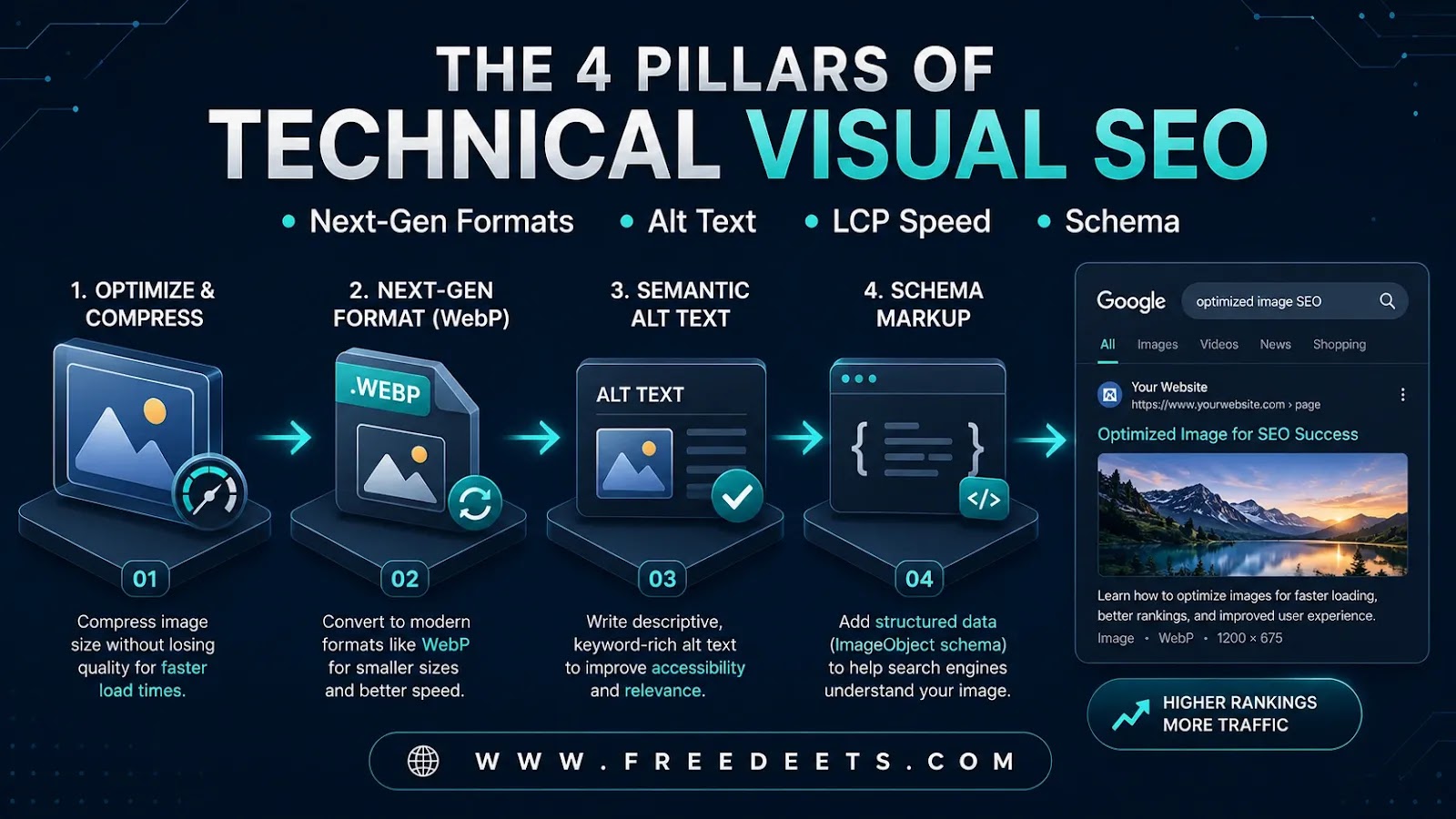
Legacy formats like uncompressed JPEG and heavy PNG files inflate page weight. Modern publishing frameworks favor WebP and AVIF, which deliver crisp image fidelity at file sizes 30% to 50% smaller than legacy formats. Converting existing assets to WebP reduces bandwidth usage and accelerates server response times.
Descriptive File Names and Contextual Alt Text
Search crawlers rely on explicit text labels to interpret image subject matter. Avoid default device names like IMG_5821.jpg. Instead, use hyphenated descriptive titles such as image-and-video-optimization-workflow.webp.
Write alt attributes primarily for screen readers, clearly explaining what the graphic depicts. Incorporate supporting keywords naturally without keyword stuffing, which search algorithms actively penalize.
Specify Dimensions and Native Lazy Loading
Always declare explicit width and height attributes on your image tags. This reserves dedicated space in the browser rendering tree before the file downloads, completely eliminating layout shifts (CLS). Pair this with native browser lazy loading (loading="lazy") on below-the-fold assets so that hero content renders instantly.
3. Video SEO: Capturing SERP Real Estate and Rich Cards
Video content commands high visibility across search engine result pages. Pages containing properly structured video elements qualify for rich snippets, video badges, and carousel tabs:
| Video SEO Strategy | Implementation Method | Search Engine Impact |
|---|---|---|
| VideoObject Schema | Embed JSON-LD markup with uploadDate and thumbnailURL | Qualifies page for rich video search badges and thumbnails |
| Key Moments & Timestamps | Include structured chapter markers in descriptions | Enables direct navigational deep links within Google SERPs |
| Responsive Embed Wrappers | Use CSS aspect-ratio containers for YouTube/Vimeo embeds | Prevents mobile layout breaks and preserves page speed |
4. Optimizing for Visual Search Engines and Google Lens
Visual discovery platforms—led by Google Lens, Pinterest Lens, and multi-modal AI systems—have transformed product discovery. Rather than relying solely on typed queries, millions of users search by uploading photos, taking camera snapshots, or reverse-searching images.
To ensure your visual assets are indexed accurately by visual search models, apply these standard practices:
- Use Original Imagery: Standard stock photos produce repetitive visual hashes. Custom photography and unique graphics rank significantly higher in reverse visual matching.
- Maintain High Contrast: Ensure primary subjects are centered, sharp, and well-lit to assist computer vision models in edge and object detection.
- Surround Graphics with Relevant Text: Visual search algorithms analyze the surrounding headings, captions, and paragraphs to verify topical relevance.
5. 5 Proven Strategies for Image & Video Optimization
Implementing a repeatable visual workflow ensures that every media asset supports your organic rankings without slowing down page load times:
- Compress Assets Before Uploading: Use lossy or lossless compression tools to reduce image sizes below 150 KB and video thumbnails below 80 KB.
- Implement VideoObject and ImageObject Schemas: Follow technical standards documented by the World Wide Web Consortium (W3C) to format structured metadata that search crawlers parse seamlessly.
- Create Embeddable Infographics: Provide custom embed code beneath data visualizations to earn authoritative, contextual backlinks from industry bloggers.
- Leverage Responsive
srcsetAttributes: Serve scaled asset resolutions tailored to the visitor’s specific viewport, preventing mobile devices from downloading large desktop images. - Audit Media Performance Regularly: Use Google PageSpeed Insights and Search Console to identify slow-loading assets and resolve media indexing errors.
Frequently Asked Questions About Image & Video Optimization
How does image & video optimization affect Google Core Web Vitals?
Unoptimized media files inflate total page size and delay Largest Contentful Paint (LCP). Additionally, images without explicit width and height attributes cause elements to shift during loading, degrading Cumulative Layout Shift (CLS). Proper optimization resolves both issues.
What is the ideal file size for blog images?
As a best practice, standard in-content images should remain under 150 KB, while full-width hero banners should stay under 250 KB. Converting assets to WebP or AVIF makes it easy to maintain high resolution within these file size limits.
Does Google index videos hosted on third-party platforms like YouTube?
Yes. Embedding YouTube videos on your website is fully supported by Google. By adding VideoObject schema markup and structured timestamps to your page, your embedded video can qualify for rich SERP features without consuming your server bandwidth.
Core Takeaways for Visual SEO
- Convert images to WebP or AVIF to cut file sizes by up to 50%.
- Always include explicit width and height attributes to prevent CLS layout shifts.
- Add VideoObject schema markup to earn rich snippet real estate on Google SERPs.
Conclusion
Mastering image & video optimization is essential for maximizing organic search traffic in today’s visual-first search environment. By combining next-gen file compression, responsive asset scaling, structured schema markup, and accessible alt text, you satisfy Google’s technical performance standards while delivering a fast, engaging experience that keeps readers on your site.